
Elevate - Brain Training Games
The Mind CompanyEducation
4.651.34K Reviews
- Version
- 5.265.0
- Installs
- 10.00M
- Age Rating
- Everyone
Screenshots


Our Review of Elevate - Brain Training Games
 Analysis by Appyee
I tend to think of brain training as a small, repeatable activity rather than a shortcut to becoming smarter. That distinction matters with Elevate - Brain Training Games: it gives me quick, structured challenges in areas such as language and math, which can make a spare moment feel more purposeful. I like that its focus is practical skills, but I would treat it as a way to practise and stay engaged, not as a substitute for studying, reading, or professional advice about cognitive health.
Using it around other people
When I use a puzzle app around other people, I find it helps to decide in advance whether the phone is being passed along or the activity is simply taking place in a shared space. That small distinction can keep a relaxed household break from becoming a muddled shared profile, and it leads naturally to setting clear boundaries before anyone starts.
A shared phone is not automatically a shared routine
Picture a household where one person opens a brain-training app while waiting for dinner, then hands the phone to someone else to check a message. That is a realistic setting for a short puzzle, but it is not the same as creating a family training plan. I would approach Elevate as an individual activity: each person should be clear about whose experience they are using, especially if a device is passed around.
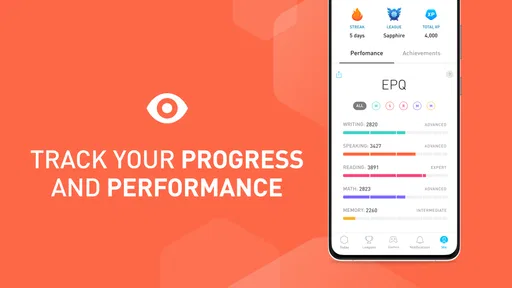
The personalized assessment and progress tracking are designed around an individual’s performance. If several people take turns on one profile, their answers can become mixed together, making the feedback less useful. A better household habit is to keep sessions separate in practice: one person completes their own workout, then another uses the device for their own account or session only if the app’s available setup supports that. I would not assume the app provides family profiles or a dedicated shared-device mode.
Set boundaries before the first session
For a child who wants to try a puzzle, I would have an adult check the app and its purchase prompts first, then agree on whether the device is being used for a short activity or for open-ended play. Elevate is free to download, but it includes in-app purchases, so “free” should not be taken to mean every option is available at no cost. The listed purchase range runs from $0.99 to $399.99 per item; that wide range makes it sensible to review any purchase screen together rather than letting a child tap through it alone.
There is also a practical boundary around routine. A short session can fit neatly into a break, but I would not make a child feel that a progress score is a school grade or a measure of intelligence. The useful goal is practising a task and noticing what feels easier with repetition. If a score creates pressure or frustration, it is reasonable to stop, switch activities, or use a book, conversation, or offline game instead.
Coordinate without turning practice into a contest
Progress dashboards can make personal improvement visible, yet comparing one household member’s results with another’s can easily miss the point. People may have different starting skills, reading comfort, language backgrounds, or familiarity with this style of puzzle. I would encourage each person to compare their own attempts over time rather than treating the app as a leaderboard for the family.
A low-friction way to coordinate is to choose a shared time, not a shared score: perhaps each person uses a few minutes while waiting for a meal, then puts the phone away. That creates a routine without requiring anyone to coach the others or compete. It also avoids a common trap with brain-training apps—spending more time discussing streaks or results than actually practising.
Age, trust, and realistic expectations
The app is rated for Everyone, which makes it broadly accessible, but an age label alone does not decide whether its exercises suit a particular child. I would pay attention to whether the instructions make sense, whether the pace feels comfortable, and whether the person enjoys the activities. The developer is The Mind Company, and the app has been available since June 4, 2014; its current version is 5.226.0. It has a 4.6 average from around 506,000 ratings and over 10 million installs, which suggests a large audience, though popularity is not proof that every exercise fits every learner.
It is also worth being clear about what a brain-training score can tell you. The app can show performance within its own activities, but I would not read a strong result as proof of a broad change in everyday memory, school achievement, or health. For focused learning—such as practising a language for an exam or working through a maths curriculum—lessons, a tutor, or subject-specific exercises are usually a better match. Elevate works best as a compact supplement, not as the whole plan.
Where it fits among learning apps
Compared with a flashcard app, Elevate is less about building and reviewing a personal deck of facts; compared with a course app, it is less about following a long sequence toward a defined subject goal. Its appeal is variety: short tasks can shift between language-related skills and math, so I can choose a quick mental break without deciding what to study for a full lesson. That variety is also a trade-off. If I need to master a specific vocabulary list, grammar topic, or school unit, a targeted tool gives me more control over the material.
For an everyday example, I might open it during a commute wait or while a kettle boils, complete a brief activity, and then stop rather than letting a quick break become another long phone session. A useful tip is to notice which exercise types feel difficult and practise them when I can give them attention, rather than rushing through just to finish a daily routine. If the goal is relaxation, a casual game may be more enjoyable; if the goal is measurable progress in a real subject, a structured course may be more effective.
Who is likely to enjoy it—and who may not
I think Elevate suits adults and older students who like bite-sized challenges, want variety, and are willing to practise without expecting dramatic results. It can also work for someone who finds a blank study session hard to start: choosing a short activity provides a clear first step. The app is less suitable for anyone who dislikes timed or game-like tasks, needs detailed teaching before practising, or wants a complete curriculum with lessons that build toward a qualification.
Another trade-off is the difference between the free experience and paid access. The app is free, while in-app purchases are available, and I would explore what is usable without paying before deciding whether extra access is worth it to me. I would not rely on an assumption that a free trial is always available; instead, I would check the current offer and subscription terms on the device before starting anything that could renew. That small check prevents a pleasant trial session from becoming an unexpected expense.
First Impressions
When I first opened Elevate, the sleek and user-friendly interface immediately stood out. It has this modern, clean vibe that makes you feel like you're about to embark on a high-tech journey for your brain. Setting up the app was a breeze, too. You start by taking a quick assessment to tailor the experience to your specific needs. It's like the app is your personal brain coach, which is pretty cool, right?
Personalized Training
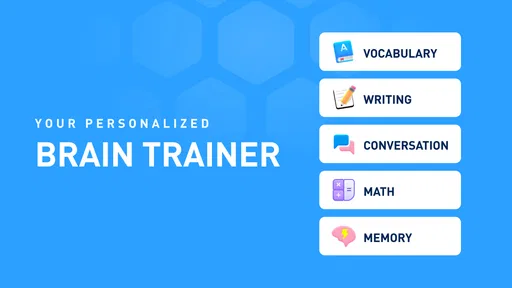
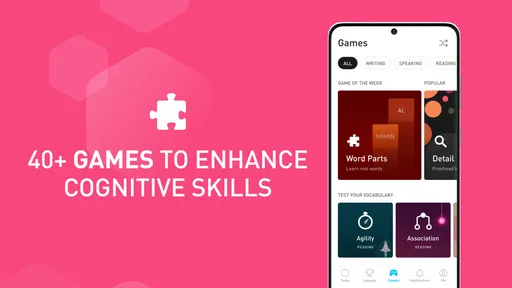
One of the things that really impressed me about Elevate is how personalized the training feels. Once you've done the initial assessment, the app crafts a daily workout for your brain. These sessions focus on various skills like reading, writing, speaking, and even math. And don't worry if numbers aren't your thing—it's all about making you better, not perfect.
Each session is short, around 5 minutes, which is perfect for squeezing into a busy schedule. And the best part? The games are genuinely fun. I found myself looking forward to my daily brain workout, which is something I never thought I'd say!
Tracking Your Progress
Another feature I love is how Elevate keeps track of your progress. There's a nifty dashboard that shows how you're improving over time. You get a detailed breakdown of your performance in different areas, which is super motivating. Who doesn't love seeing their hard work pay off?
The app also sends you weekly reports, highlighting your achievements and areas that need a bit more love. It feels like having a personal trainer cheering you on, which is a huge plus for those of us who need that extra push.
Accessibility and Design
Now, let's talk about accessibility. Elevate is available on both Android and iOS, so no matter what device you're rocking, you're covered. The design is intuitive, and I never found myself lost or confused about what to do next. Plus, the graphics are easy on the eyes, making it a pleasant experience overall.
The app also offers various language options, which is fantastic if English isn't your first language. This inclusive approach means more people can benefit from the brain-boosting goodness that Elevate offers.
Subscription Model
Alright, let’s talk about the elephant in the room: the subscription. While Elevate does offer a free version, the premium subscription unlocks a lot of additional features. It's not just more games—it's about getting the most out of your training. For those who are serious about their brain health, it’s a worthy investment.
And hey, there's usually a free trial available, so you can test the waters before diving in. I found that trying out the premium features really showcased what the app is capable of, adding more depth and variety to the training sessions.
Final Thoughts
So, is Elevate - Brain Training Games worth your time? Absolutely. Whether you're looking to enhance your cognitive skills or just want to challenge yourself in a fun way, this app delivers. It's like having a pocket-sized brain gym that fits into your lifestyle seamlessly.
Give it a shot and see for yourself. Who knows? You might just find that brain training is your new favorite hobby. Happy training!
Privacy and Permissions
See what permissions an app requests and how it handles your data.
- Wi-Fi connection information
- view Wi-Fi connections
- Other
- view network connections, full network access, use accounts on the device, control vibration, prevent device from sleeping, Google Play license check
Verdict
Strengths of Elevate - Brain Training Games
- Engaging and interactive exercises.
- Customizable training sessions.
- Tracks progress over time.
- Improves cognitive skills effectively.
- User-friendly interface.
Limitations of Elevate - Brain Training Games
- Limited free content available.
- Some features require a subscription.
- May not suit all learning styles.
- Occasional app performance issues.
- Requires consistent use for best results.
Other Releases by The Mind Company
View All
Spark: Daily Learning Puzzles
Education4.5
Similar Picks in This Category
View All
Duolingo: Language Lessons
Duolingo4.7

Google Classroom
Google LLC2.8

Unacademy: Learn & Crack Exams
Unacademy3.2

Bible App for Kids
Life.Church4.4

Cake - Learn English & Korean
Cake Corp.4.7

Brainly: AI Homework Helper
Brainly4.5
Frequently Asked Questions
What is Elevate - Brain Training Games and how does it work?
Elevate is a brain training app designed to improve cognitive skills such as focus, memory, processing speed, and more. It offers personalized training programs tailored to your specific needs, with over 40 games that challenge various aspects of your mental acuity. The app adapts to your progress, ensuring that the difficulty level matches your abilities.
Is Elevate suitable for all age groups?
Yes, Elevate is designed for a wide range of age groups, from teenagers to adults. The app’s adjustable difficulty settings and personalized training programs make it accessible for anyone looking to enhance their cognitive skills. However, younger children might find the challenges less engaging due to the complexity of some tasks.
Do I need an internet connection to use Elevate?
While an internet connection is required to initially download and set up the app, many of the games can be played offline once they are loaded. However, for the best experience, including progress tracking and personalized updates, an internet connection is recommended when using the app.
Are there any in-app purchases or subscriptions in Elevate?
Elevate offers both a free version and a premium subscription. The free version includes a limited number of games and features daily exercises. The premium subscription unlocks all games, personalized training plans, and detailed performance tracking. Subscriptions are available on a monthly or annual basis, providing greater flexibility for users.
How does Elevate ensure the privacy and security of user data?
Elevate takes user privacy and security seriously. The app adheres to strict data protection policies and complies with privacy laws. User data is encrypted and only used to enhance the app's functionality and provide personalized experiences. Elevate does not sell or share personal information with third parties.
